
Command Overview
In 30 seconds
A Command is a one-shot action (load file, show model, attach UI). Get it from any component with getCommand(MyCommand.class).run(), or trigger it indirectly with callCommand / linkCommand / waves. Pick the thread with @RunInto or base classes (DefaultUICommand = JAT, DefaultPoolCommand = JTP).
How to use
- Create a class extending
DefaultCommand,DefaultUICommand, orDefaultPoolCommand(or bean variants). - Implement
initCommand()for setup andperform(Wave)for the action body. - Annotate with
@RunInto(RunType.JAT|JIT|JTP)if you do not use a default base class. - Trigger from a Model, Service, or another Command:
getCommand(MyCommand.class).run(). - From a View Controller, wire UI events with
linkCommand(node, eventType, MyCommand.class, waveData...). - For multi-step flows, extend
DefaultMultiBeanCommandand list sub-commands indefineSubCommand().
A command is an atomic reusable action that could be triggered from anywhere. There are two kinds of Commands:
- Single Command
- Multi Command (composed by a set of Single Command)
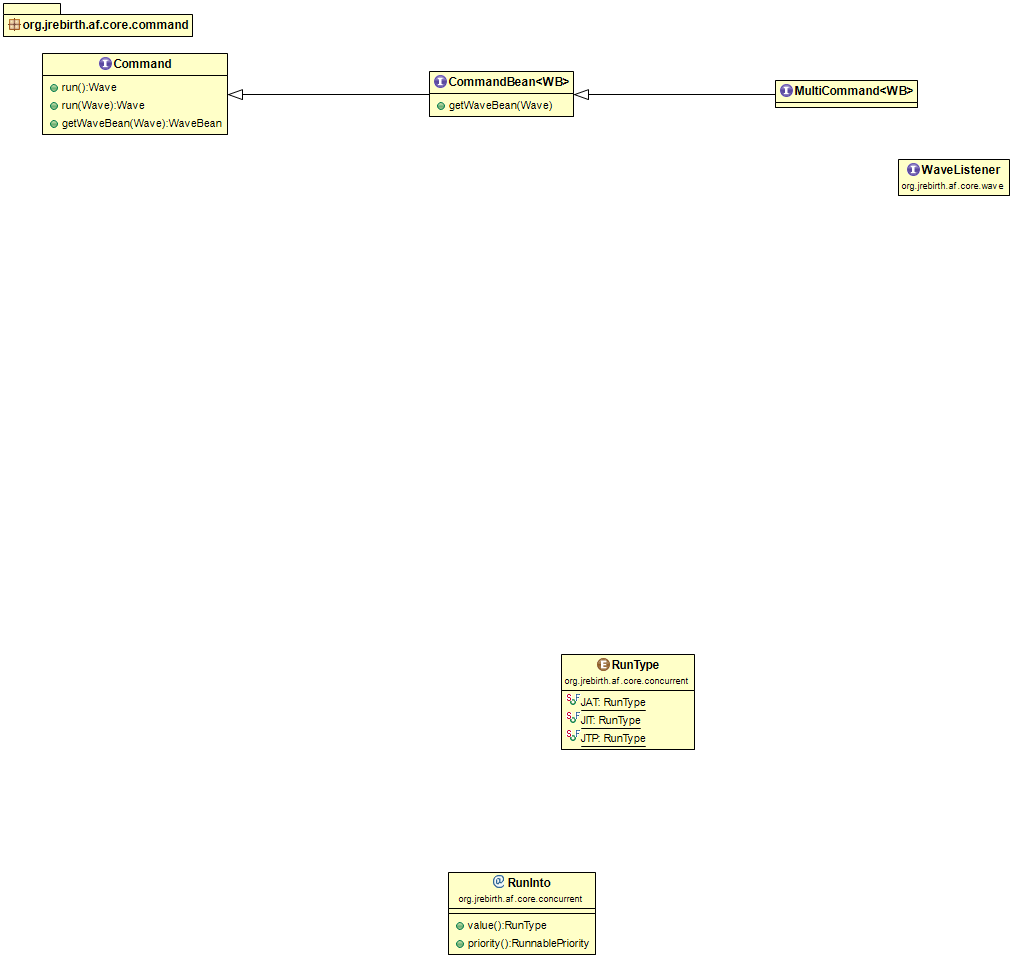
Single Command
Single Commands are atomic and are run independently. If you trigger several commands in-a-row you will trigger them in parallel according to their predefined running thread. JRebirth engine will serialize their instantiation and their startup but they will be processed into JAT, JIT or one of JTP slots. JAT and JIT will process command one after the other. JTP will act in the same manner but internal engine will dispatch all actions to its pooled threads (by default {2 x Number of CPU core} slots are available by Thread Pool).
Minimal single command:
@RunInto(RunType.JIT)
public class LogActionCommand extends DefaultCommand {

    @Override
    protected void perform(final Wave wave) {
        LOGGER.info("Action executed");
    }
}
DefaultCommand— runs on JIT by default (via class annotation).perform(Wave)— only mandatory method; called once perrun().- Trigger with
getCommand(LogActionCommand.class).run()from any component.
MultiCommand
MultiCommand provides the ability to run some Single Commands sequentially (even across several threads) or in parallel.
Hereafter you will find an example of MultiCommand used to display a model UI:
package org.jrebirth.af.core.command.basic.showmodel;

import java.util.Arrays;
import java.util.List;

import org.jrebirth.af.api.command.Command;
import org.jrebirth.af.api.key.UniqueKey;
import org.jrebirth.af.core.command.multi.DefaultMultiBeanCommand;

/**
 * The class <strong>ShowModelCommand</strong>.
 *
 * Run into JIT and is sequential
 *
 * @author Sébastien Bordes
 */
public class ShowModelCommand extends DefaultMultiBeanCommand<DisplayModelWaveBean> {

    /**
     * {@inheritDoc}
     */
    @Override
    protected List<UniqueKey<? extends Command>> defineSubCommand() {
        return Arrays.asList(
                             getCommandKey(PrepareModelCommand.class),
                             getCommandKey(AttachModelCommand.class));
    }

}
extends DefaultMultiBeanCommand<DisplayModelWaveBean>— multi-step command sharing one wave bean type.defineSubCommand()— ordered list of child commands;ShowModelCommandruns prepare then attach.getCommandKey(PrepareModelCommand.class)— resolves each sub-command's registration key from the facade.- Sub-commands keep their own
@RunInto/ base-class thread (JTP for prepare, JAT for attach).
The multi command code will be run into JIT, but its sub-command will be run respectively into JTP and JAT (according to their own configuration).
Why are they using these threads ?
ShowModelCommand use the annotation defined into DefaultMultiCommand to run into JIT.
PrepareModelCommand use the annotation defined into DefaultPoolCommand to run into JTP.
ShowModelCommand use the annotation defined into DefaultUICommand to run into JAT (it's mandatory to update scene's nodes within JAT).
How to trigger a Command
Commands are designed to be disposable after usage, but they could be retained by strong references to be executed twice or more or store data. Each call will return a new instance of the command class, because each command was stored with a timestamp key-based. (Timestamp is added to the default key and also for custom key).
You can create a command using four different ways:
- Direct way : getCommand(Command.class).run()
- Indirect way (Wave)
- From Controller by using linkCommand method
- Messaging way
Please note that Commands are JRebirth top-level components (with Services and Models), they follow the component lifecycle as described in Facade Page.
Thus AbstractBaseCommand extends BehavioredComponent and Component and their descendants must provide initCommand(), processAction() and execute() methods.
Direct way
It's possible to call a command from any JRebirth component (Command, Service, Model).
You just need to call the getCommand method to build an instance. You can provide either the Command Class or its unique key (if required).
<C extends Command> C getCommand(final Class<C> clazz, final Object... keyPart);
getCommand(Class, keyPart...)— retrieves or creates a command from CommandFacade.- Optional key parts distinguish multiple instances of the same command class.
Once you have retrieved your command, you can store it with a strong reference to avoid GC collecting it. Your command life will depend on the lifetime of your strong reference. Thus you will be able to configure directly your command properties. Finally to trigger it you must call its run() method. The perform method of the command will be executed into the Thread Type chosen (JAT, JIT, JTP) by the Command declaration.
Minimal direct trigger from a Model:
@Override
protected void initModel() {
    getCommand(OpenFileCommand.class).run();
}
getCommand(OpenFileCommand.class)— retrieves (or creates) the command instance from the CommandFacade..run()— schedulesperform(Wave)on the thread declared for that command class.
Wave run();
run()— returns the wave used for this execution (useful for chaining or debugging).
Be careful: As explained here each call to getCommand could retrieve the same OR another instance of the command class depending on key parts provided and instance's strong references. (in this case no timestamp is added to the command key)
Indirect way
You can trigger a command execution by calling callCommand from any component, it will use JIT to trigger the command then the command will be run using the thread declared.
You can provide some parameters into WaveData that will be hold by the wave and so available into the command.
public final Wave callCommand(final Class<? extends CommandBean<? extends WaveBean>> commandClass, final WaveBean waveBean, final WaveBean... waveBeans) {
callCommand(Class, WaveBean, ...)— indirect trigger via JIT; command runs on its own thread.- Accepts a primary bean plus optional extra beans for chained command data.
You can also provide a WaveBean object to store all data.
callCommand(ShowModelCommand.class, displayModelWaveBean);
callCommand— schedules command creation/run via JIT; command then runs on its own thread.WaveBean— typed bag of properties instead of rawWaveDatavarargs.
Convenient Link method
UI's controllers provide a convenient method named void linkCommand(Node, EventType<E>, Class<? extends Command>, WaveData<?>…)
This method is useful to declare with only one line of code the call of a command triggered when the chosen JavaFX event occurred on a node belonging to the View.
It's also possible to add a callback function, in example to manage double-click detection (see LinkedCallback).
linkCommand(view().getOpenButton(), MouseEvent.MOUSE_CLICKED, OpenEventTrackerFileCommand.class, CHECK_MOUSE_SINGLE_CLICK);
view().getOpenButton()— JavaFX node in the View (Controller hasview()accessor).MouseEvent.MOUSE_CLICKED— JavaFX event type that fires the command.OpenEventTrackerFileCommand.class— command class resolved from CommandFacade.CHECK_MOUSE_SINGLE_CLICK— optionalWaveData/ callback to filter events (e.g. ignore double-click).
Messaging way
Any Command is a JRebirth component and can benefits of Observer features. It's possible to listen a WaveType (registration done into the initModel, initService and initCommand methods, or using @OnWave) in order to be notified when a such wave is sent. You can manage custom methods called by reflection to handle waves and can you catch all waves into the processAction(Wave) method.
More information is available in Notifier & Component page.
Be careful, commands can handle asynchronous wave only if they haven't been collected by the Garbage Collector! So you need to create a instance and to keep a strong references on it somewhere.
@Override
protected void initCommand() {
    listen(MyWaves.DO_SAVE);
    // keep this command instance alive while listening
}

@Override
protected void perform(final Wave wave) {
    // default path when no doXxx handler matches
}
listen(...)ininitCommand()— command reacts to waves while the instance is retained.- Hold a strong reference (
getCommand(...)stored in a Model field) or the listener is GC'd. perform(Wave)— fallback when wave handling is not delegated to adoXxxmethod.
Command Properties
A command is an atomic action reusable or not that can be run into a predefined thread. A command provides specific features:
- A property indicating in which thread it must be run
- A Component Key, built with Class Name and an additional string
- An Action to process (perform(Wave) method)
- A Wave Bean Generic Type that will hold all required data to process the action
- Optional custom properties (useful for reusable commands)
How to manage Threading issues
Each command will be launch by JRebirth Internal engine and run into a dedicated thread. Threads involved in a JRebirth application are explained into the Thread page.
The runner thread can be configured using two ways:
The priority rule is : Annotation > Constructor argument > Default value. The default value is : JIT (JRebirth Internal Thread). The top-level annotation will be systematically used overriding lower ones and also constructor arguments.
Annotation usage
To run a command into the JAT (JavaFX Application Thread), use this annotation :
@RunInto(RunType.JAT)
RunType.JAT— JavaFX Application Thread; required for direct scene/node updates.RunType.JIT— JRebirth Internal Thread; messaging-safe, not for UI nodes in scene.RunType.JTP— thread pool slot; long I/O or CPU work off UI and JIT.
To run a command into the JIT (JRebirth Internal Thread), use this annotation :
@RunInto(RunType.JIT)
To run a command into JTP (JRebirth Thread Pool, the command will be run into a slot), use this annotation :
@RunInto(RunType.JTP)
Class inheritance usage
To run a command into the JAT (JavaFX Application Thread), extends the DefaultUICommand class :
public class AttachModelCommand extends DefaultUIBeanCommand<DisplayModelWaveBean> {
DefaultUICommand/DefaultUIBeanCommand—@RunInto(JAT)baked in for scene updates.
To run a command into the JIT (JRebirth Internal Thread), extends the DefaultCommand class :
public class ChainWaveCommand extends DefaultCommand implements WaveListener {
DefaultCommand— runs on JIT; base for messaging-safe atomic commands.WaveListener— optional; receive all waves inprocessWavein addition todoXxxhandlers.
To run a command into JTP (JRebirth Thread Pool, the command will be run into a slot), extends the DefaultPoolCommand class :
public class PrepareModelCommand extends DefaultPoolBeanCommand<DisplayModelWaveBean> {
DefaultPoolCommand/DefaultPoolBeanCommand— runs on JTP for I/O or CPU-heavy work.
Constructor argument usage
It's also possible to define the runType (The thread which will handle the command) by passing RunType, each descendant classes of AbstractBaseCommand offer at least one constructor allowing this enum value to the command constructor.
public AbstractBaseCommand(final RunType runType, final PriorityLevel priority) {
- Constructor
RunType— alternative to@RunIntowhen subclassingAbstractBaseCommanddirectly. - Annotation wins over constructor; constructor wins over the base-class default.
Component Key
The component key as described in the Facade page allow storing unique commands.
All objects provided as key part will be serialized (toString call) to build the key. Warning : When a command is built consequently to a wave reception, the wave UID will be concatenated to the class name instead of using key parts.
Execute Code
Command are run in a custom thread in 3 steps:
- beforePerform
- perform
- afterPerform
Only the perform method must be implemented to execute your action.
Minimal custom command:
@RunInto(RunType.JTP)
public class LoadDataCommand extends DefaultCommand {

    @Override
    protected void initCommand() { /* optional setup */ }

    @Override
    protected void perform(final Wave wave) {
        // long work on JTP — send result via sendWave when done
    }
}
@RunInto(JTP)— runsperformon a thread-pool slot, not on the JavaFX thread.initCommand()— called once when the command instance is prepared (register waves here if needed).perform(Wave)— your action; may readwavedata or an attachedWaveBean.
Wave Bean
A WaveBean is a Java Bean that allow carrying a lot of named properties into a Wave.
Command Classes can declare a generic type that allow to cast the Wave Bean into the right one, it allows to use getWaveBean().getMyProperty() into source code which is more convenient than parsing WaveData (but it implies to create a dedicated Java Class).
public class OpenFileCommand extends DefaultPoolBeanCommand<OpenFileWaveBean> {

    @Override
    protected void perform(final Wave wave) {
        final File file = getWaveBean().getFile();
        // ...
    }
}

public class OpenFileWaveBean implements WaveBean {
    private File file;
    public File getFile() { return file; }
    public void setFile(final File file) { this.file = file; }
}
DefaultPoolBeanCommand<OpenFileWaveBean>— generic binds the bean type for typed access.getWaveBean()— cast-free access insideperform; populated bycallCommandorlinkCommand.- Prefer beans when a command carries more than two or three parameters.
Custom properties
Each command is a simple Java Object, you can add fields or JavaFX Properties to help configuring your execution code. You must pay attention that these values will be kept until the command is disposed (after execution if no strong references exists).
For example you can attach a command to a Model and launch it several times while updating command's properties.
private final SaveCommand saveCommand = getCommand(SaveCommand.class);

void saveDraft() {
    saveCommand.setDraft(true);
    saveCommand.run();
}

void saveFinal() {
    saveCommand.setDraft(false);
    saveCommand.run();
}
- Store
getCommand(...)in a field — strong reference keeps the instance and its custom properties. - Configure fields/properties on the command before each
run()for reusable commands.
Built-in Commands
JRebirth provides several ready-to-use commands:
| Command | Purpose | Thread |
|---|---|---|
ShowModelCommand |
Display a model's view (prepare + attach) | JIT → JTP → JAT |
ShowFadingModelCommand |
Show with fade transition | JIT → JTP → JAT |
FadeInOutCommand |
Fade a node in or out | JAT |
ChainWaveCommand |
Execute a list of waves sequentially | JIT |
AttachModelCommand |
Attach a model's node to a parent | JAT |
DetachModelCommand |
Remove a model's node from parent | JAT |
PrepareModelCommand |
Build model's view off-screen | JTP |