
Facade(s)
In 30 seconds
The GlobalFacade (from your Application) owns UiFacade, CommandFacade, ServiceFacade, and BehaviorFacade. Each facade stores components by UniqueKey (class = singleton, extra key parts = multiton). Use getModel, getCommand, getService — never new top-level components yourself.
How to use
- From any
FacadeReadycomponent, callglobalFacade()to reach the global facade. - Retrieve UI:
getModel(MyModel.class)orgetModel(MyModel.class, keyPart). - Run actions:
getCommand(MyCommand.class).run(). - Async work:
returnData(MyService.class, MyService.DO_TASK, waveData...). - Behaviors: attach via the BehaviorFacade through
BehavioredComponentAPIs on Models/Commands/Services.
JRebirth provides 4+1 Facades used to manage its dedicated pattern wB-CS-Mvc.
Overview
Short UML Diagram:
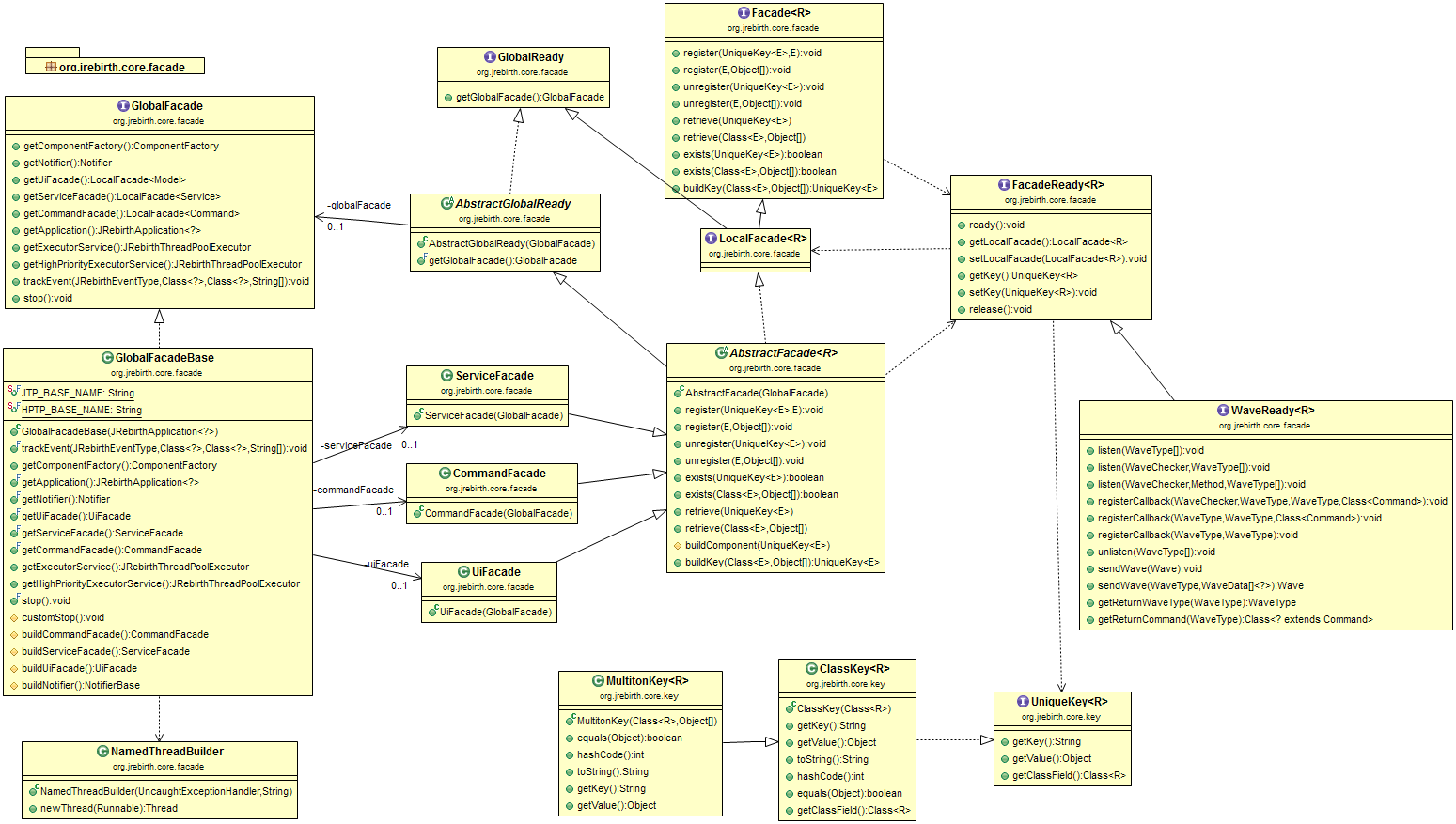
Global Facade
One Facade to rule them all
JRebirth uses a global facade automatically created by JRebirth AbstractApplication class. Its main role is to manage all JRebirth components by using Facades.
Internal Communication
The global facade creates automatically the JRebirth notification engine. You should read the Notifier page to have more informations.
Linked with Application
The global facade also allows to communicate with the Application class and therefore with its stage and scene.
Manage Local Facades
It allows to manage the three main facades (+extra one):
- CommandFacade
- ServiceFacade
- UiFacade
- BehaviorFacade
The GlobaleFacadeBase allows to get each of these facades by calling appropriate getters:
LocalFacade<Model> uiFacade();
uiFacade()— accessor on GlobalFacade for all UI Models (same pattern forcommandFacade(),serviceFacade()).
Minimal retrieval from a Model:
// Same thread as caller — use only for quick synchronous access
final OtherModel other = getModel(OtherModel.class);
other.refresh();

getCommand(SaveCommand.class).run();
returnData(FileService.class, FileService.DO_SAVE, WBuilder.waveData(FileWaves.FILE, file));
getModel(Class)— UiFacade lookup; creates instance on first access if absent.getCommand(Class).run()— CommandFacade; runs on the command's configured thread.returnData(...)— ServiceFacade async task; result arrives as a return wave.
This link is bidirectionnal because global facade is accessible from the 3 main facades by calling :
- getGlobalFacade() (each facade extends the AbstractGlobalReady abstract class which implement GlobalReady interface.
package org.jrebirth.af.api.facade;

@FunctionalInterface
public interface GlobalReady {

    GlobalFacade globalFacade();
}
GlobalReady— implemented by all facades and components with facade access.globalFacade()— entry point to Ui/Command/Service/Behavior facades.
Local Facades
There are 4 LocalFacade, each one is responsible of an area storing same kind of components.
Basic Features
Each Facade can manage its components (also called readyObject) throught some public methods.
- register : store a pre-built component
- unregister : remove a component
- exists : check if the component is already registered, it could be released
- retrieve : used to get a component (build and register it if needed)
<E extends R> void register(final UniqueKey<E> uniqueKey, final E readyObject);
register(key, instance)— store a pre-built component under an explicit key.retrieve(key)/getModel/getCommand— fetch existing or create-and-register.exists(key)— check registration without creating.unregister(key)— drop from facade; component may be GC'd if nothing else holds it.
Component Key
Each Component (b-CSM) are registered into the facade using a UniqueKey, there are 2 options:
ClassKey
The simplest key is the ClassKey, it's only composed by the class object of the component, thus the can only be stored once into the facade (=singleton).
// Singleton — one CounterModel for the whole application
final CounterModel model = getModel(CounterModel.class);
getModel(Class)— usesClassKey; second retrieve returns the same instance.- Same pattern for
getCommand(MyCommand.class)andgetService(MyService.class).
MultitonKey
The MultitonKey uses also the class of the component but add a variable part to be able to store several instances of a same Component.
// Multiton — one EditorModel per document id
final EditorModel doc1 = getModel(EditorModel.class, "doc-1");
final EditorModel doc2 = getModel(EditorModel.class, "doc-2");
- Extra key parts distinguish instances of the same component class.
- Key parts are concatenated via
toString()— use stable, unique identifiers.
Convenient Builder
JRebirth API has got a lot of methods that take the Component Class with additional objects as key parts, but the API also provides a convenient class used to build key.
static <C> UniqueKey<C> create(final Class<C> clazz, final Object... keyPart);
create(MyModel.class)— singleton key (class only).create(MyModel.class, "tab-1")— multiton: severalMyModelinstances keyed by"tab-1".- Key parts are serialized via
toString()— use stable, unique values.
Component Lifecycle
When a component is retrieved from its facade:
- retrieve() — if not cached, creates a new instance
- setup() — initializes the component (calls
initCommand/initService/initModel) - ready — component is active and can receive waves
- release() — component is deregistered and eligible for GC
Components with wave listeners are strongly referenced by the Notifier and won't be collected until unlisten() is called or the component is explicitly released.
// Typical lifecycle from a Model
final DetailModel detail = getModel(DetailModel.class, itemId);
detail.refresh(item);          // ready — can send/receive waves
// ...
globalFacade().uiFacade().release(detail.getModelKey());  // explicit cleanup
- First
getModel→ retrieve + setup + ready. release(key)— deregister from facade; Notifier drops listeners if component releases properly.
Provide Tracking
JRebirth allows to track all creation & finalization of each component (Command, Service, Model, Behavior) and also track the emission of waves and their path.
These events are logged using the JRebirth event tracking framework. The JRebirth Analyzer application can load and replay these log files to visualize component creation, access patterns, and wave flows. Enable tracking by configuring the org.jrebirth.af.core.facade logger at TRACE level.